Architecture and Data Flow
Page role: Design guide
This section details the design philosophy of gwexpy and the internal data handling logic.
gwexpy extends GWpy to provide intuitive multi-channel time-series matrix operations and 4D physical field handling.
Search hints: architecture, data flow, TimeSeriesMatrix, ScalarField, flattening, Field API
At a Glance
The overview table below follows the shared docs table policy. On small screens, horizontal scrolling is preferred over page-local formatting changes.
Item |
Details |
|---|---|
Page Role |
Design guide |
Audience |
Users who want the mental model behind the containers, and contributors orienting themselves to internal data flow |
Prerequisites |
Basic familiarity with |
Use Cases |
Understand why Matrix and Field APIs look the way they do before diving into theory or API reference pages |
Search Keywords |
architecture, data flow, |
On This Page
Data Flow Diagram
Related Documents
How to Read This Page
Read this page first if you want the mental model behind
gwexpycontainer design and internal reshaping.For the mathematical foundations of each algorithm, continue to Physics Models and Analysis Theory.
For concrete callable surfaces, follow the API entry links in each section to the matrix API, fields API, and fitting API.
Design Philosophy
1. Matrix Object Flattening Flow
Goal: Explain how matrix-like containers are reshaped for analysis while preserving metadata.
Input: Multi-channel or matrix-like series data such as TimeSeriesMatrix and FrequencySeriesMatrix.
Output: A 2D feature representation for computation, with metadata restored on the way back.
Classes like TimeSeriesMatrix and FrequencySeriesMatrix handle automatic conversion to formats compatible with machine learning libraries like scikit-learn.
Typically, 3D data (Channels \(\times\) Samples \(\times\) Columns) is temporarily flattened into a 2D feature matrix for computation, while metadata (GPS timestamps, units) is preserved and restored after processing.
API entry: matrix API, timeseries API
2. 4D Field API Model
Goal: Explain why field containers keep all axes aligned during slicing and indexing.
Input: A ScalarField with time, frequency, and spatial axes.
Output: A field object whose grid and axis metadata remain synchronized after selection operations.
ScalarField adopts a (Time, Frequency, x, y) 4D structure as its base unit.
By maintaining all 4 dimensions during indexing operations, the package ensures that grid information and axis metadata remain perfectly synchronized with the data.
API entry: fields API, Scalar Field Slicing Guide
Data Flow Diagram
The static diagram below summarizes how the main GWexpy containers move from raw inputs to analysis APIs while keeping axis metadata available in the current docs build.
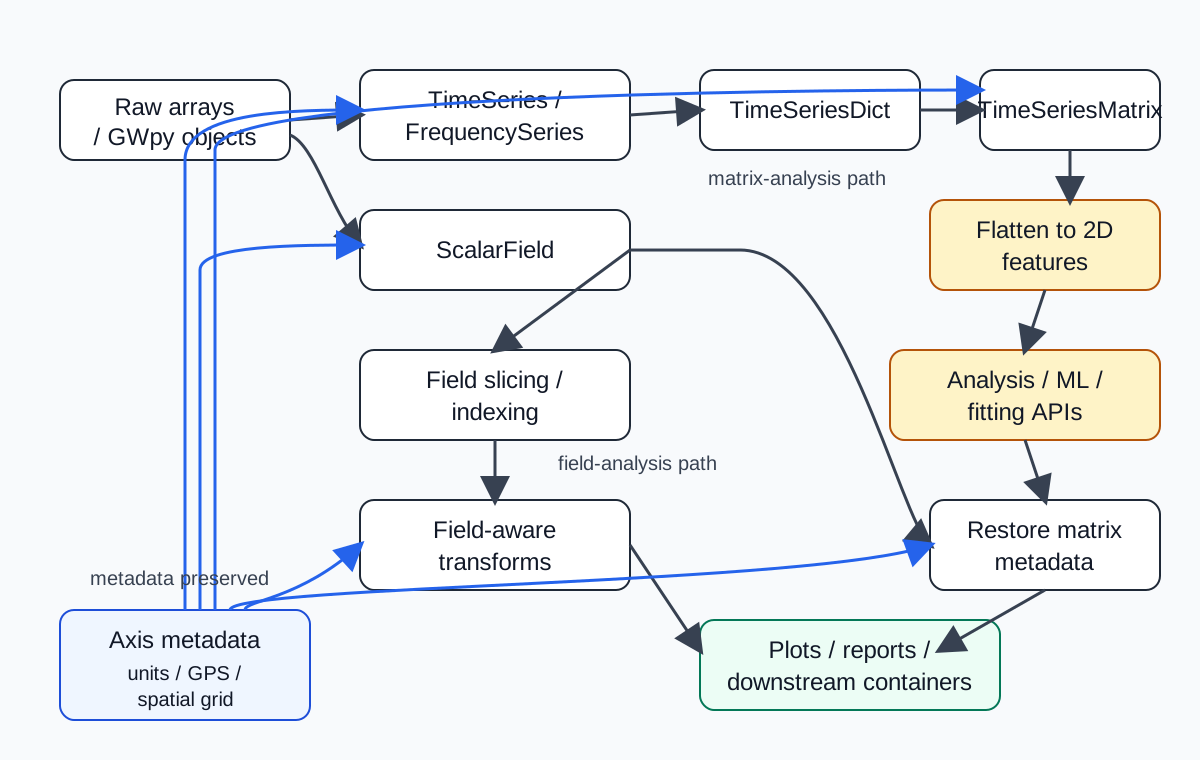
GWexpy data flow from raw arrays and GWpy objects through matrix and field analysis paths, with axis metadata preserved across reshaping and transforms.
Reading notes:
TimeSeriesDict -> TimeSeriesMatrix -> Flatten to 2D featuresis the matrix-analysis path used when scikit-learn-style algorithms expect 2D inputs.ScalarField -> Field slicing / indexing -> Field-aware transformsis the field-analysis path used when time, frequency, and spatial axes must stay aligned.Metadata is preserved across both paths so derived outputs can still be interpreted in physical coordinates rather than raw array indices alone.
Core Analysis Components
gwexpy builds advanced analysis pipelines by combining the following core components. For detailed mathematical and physical foundations, refer to Physics Models and Analysis Theory.
Multi-channel Analysis Engine: Implementation of ICA/PCA for environmental noise isolation.
Fast Correlation Framework: Accelerated coherence calculations (Bruco) for large-scale observation data.
Statistical Inference & Fitting: Parameter estimation using GLS and MCMC.
Next to Read
Physics Models and Analysis Theory — Detailed analysis theory and physics models (ICA/Bruco/MCMC)
Validated Algorithms — Validation reports for numerical algorithms
Scalar Field Slicing Guide — Details on 4D field operations
Prerequisites and Conventions — Shared FFT, GPS time, and compatibility assumptions