Note
このページは Jupyter Notebook から生成されました。 ノートブックをダウンロード (.ipynb)
[1]:
# Skipped in CI: Colab/bootstrap dependency install cell.
Bruco: 基本

Brucoは「総当たりコヒーレンス(Brute force coherence)」を計算するためのツールです。重力波検出器(LIGOやVirgo)の主チャンネル(ターゲット)と、多数の補助チャンネルとの間のコヒーレンスを計算し、ノイズ源を特定することを目的としています。 物理的な狙いは、単に相関ランキングを作ることではなく、特定の周波数帯の DARM 過剰パワーを説明できる補助チャンネル候補を見つけ、実際に対処可能な結合経路へ結び付けることです。
並列処理によるコヒーレンス計算
Pythonの multiprocessing モジュールを使用して複数のCPUコアで並列実行されます。
タスク分割: 全補助チャンネルリストをCPU数に応じて分割し、各プロセスに割り当てます。
データ取得と前処理:
各補助チャンネルのデータを取得します。
データが一定(フラット)の場合はスキップします。
サンプリングレートが出力要求レート (
outfs) より高い場合、decimate関数を用いてダウンサンプリングします。
コヒーレンス算出:
補助チャンネルのFFTとPSD(パワースペクトル密度)を計算します。
ターゲットチャンネルとのCSD(クロススペクトル密度)を計算します。
コヒーレンス を以下の式で計算します:
Top N の選出:
すべての周波数ビンについて、計算されたコヒーレンス値が既存の上位リスト(
top)よりも高い場合、その値を更新します。これにより、全チャンネルの結果を保持するのではなく、相関の高い上位チャンネルのみを効率的に記録します。
結果の集約と出力:
各プロセスから返された
cohtab(コヒーレンス値)とidxtab(チャンネルID)を結合・ソートし、最終的な上位リストを作成します。HTMLレポート作成:
markup.pyを使用してindex.htmlを生成します。これには、周波数ごとの上位相関チャンネルの表(ヒートマップ形式の着色あり)や、プロット画像へのリンクが含まれます。プロット作成:
matplotlibを使用して、コヒーレンスとスペクトルのグラフ(PNGまたはPDF)を生成します。
この実装は、大量のチャンネルデータを効率的に処理するために、FFTの事前計算、並列処理、およびメモリ効率の良いTop-N記録方式を採用している点が特徴です。
オリジナルのBruco実装は以下で公開されています。設計詳細やCLIの挙動を確認したい場合はこちらを参照してください。
このノートブックでは gwexpy の Bruco モジュールを Pythonライブラリとして 使う利点を体感するために、 対話的な解析・柔軟なデータ操作・高度な仮説検証を一通り実演します。
実データは使わず、
gwpy/numpyで生成した擬似データを利用します。CLIでは難しい「非線形結合」や「変調」の仮説検証を、Python APIで高速に試します。
よくある誤解: コヒーレンスが高いだけで因果関係が証明されたと考えること。Bruco は候補を絞るための道具であり、因果の証明ではありません。実際に対策へ進む前に、そのチャンネルが物理的に DARM の上流にあるか、共通ドライバではないか、窓関数や前処理や区間選択を変えても特徴が残るかを確認してください。
セットアップとモックデータ生成
TimeSeries を準備します。[2]:
import warnings
warnings.filterwarnings("ignore", category=UserWarning)
warnings.filterwarnings("ignore", category=DeprecationWarning)

# ruff: noqa: I001
from astropy import units as u
import matplotlib.pyplot as plt
import numpy as np

from gwexpy.analysis import Bruco
from gwexpy.analysis.bruco import FastCoherenceEngine
from gwexpy.astro import inspiral_range
from gwexpy.frequencyseries import FrequencySeriesDict
from gwexpy.noise.asd import from_pygwinc
from gwexpy.noise.wave import from_asd
from gwexpy.plot import Plot
from gwexpy.timeseries import TimeSeries, TimeSeriesDict
[3]:
rng = np.random.default_rng(7)

duration = 128  # seconds
sample_rate = 2048  # Hz
fftlength = 4.0  # seconds
overlap = 2.0  # seconds

t = np.arange(0, duration, 1 / sample_rate)

# Get aLIGO sensitivity curve (ASD)
fmax = sample_rate / 2  # Nyquist frequency
asd_aligo = from_pygwinc(
    "aLIGO", fmin=4.0, fmax=fmax, df=1.0 / duration, quantity="strain"
)

# Generate target noise based on aLIGO sensitivity curve
target = from_asd(asd_aligo, duration, sample_rate, t0=0, rng=rng).highpass(1)
target.channel = "H1:TARGET"

# Signals for auxiliary channels
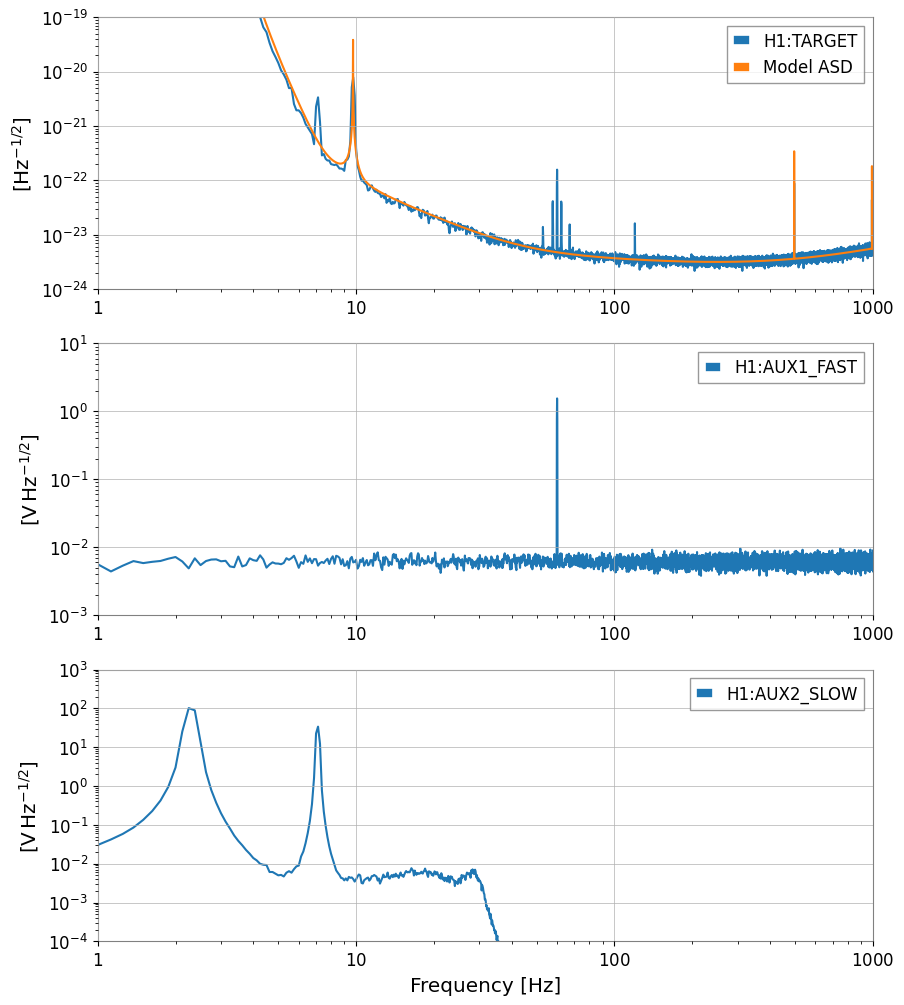
fast_line = np.sin(2 * np.pi * 60.0 * t)
slow_motion = 70 * np.sin(2 * np.pi * 2.3 * t) + 30 * np.sin(2 * np.pi * 7.1 * t)

aux1_data = 0.8 * fast_line + 0.2 * rng.normal(0, 1.0, size=t.size)
aux2_data = 0.9 * slow_motion + 0.2 * rng.normal(0, 1.0, size=t.size) + 1
aux1 = TimeSeries(
    aux1_data, sample_rate=sample_rate, t0=0, unit="V", channel="H1:AUX1_FAST"
)
aux2 = TimeSeries(
    aux2_data, sample_rate=sample_rate, t0=0, unit="V", channel="H1:AUX2_SLOW"
).lowpass(30)

# Injection signal into target: aLIGO-based noise + linear coupling + nonlinear injection
target = target + 1e-22 * target.unit * (
    aux1 / u.V + aux2 / u.V + (aux1 / u.V / 2) ** 2 + 0.01 * (aux1 * aux2 / u.V**2)
)


target.name = target.channel
aux1.name = aux1.channel
aux2.name = aux2.channel

aux_dict = TimeSeriesDict(
    {
        aux1.channel: aux1,
        aux2.channel: aux2,
    }
)

print(f"aLIGO ASD at 100 Hz: {asd_aligo.crop(99, 101).value[0]:.2e} strain/sqrt(Hz)")
print(f"Target data std: {target.std():.2e}")

plot = Plot(
    [target.asd(8, 4), asd_aligo],
    aux1.asd(8, 4),
    aux2.asd(8, 4),
    figsize=(10, 12),
    sharex=True,
)
axes = plot.get_axes()
axes[0].set_xlim(1, 1e3)
axes[0].set_ylim(1e-24, 1e-19)
axes[1].set_ylim(1e-3, 1e1)
axes[2].set_ylim(1e-4, 1e3)
axes[0].legend([target.name, "Model ASD"])
axes[1].legend([aux1.name])
axes[2].legend([aux2.name])
aLIGO ASD at 100 Hz: 3.71e-24 strain/sqrt(Hz)
Target data std: 5.08e-19
[3]:
<matplotlib.legend.Legend at 0x7f5caab7fcd0>
Section 1: 基本的なBruco解析の実行 (Jupyter上での再現)
Bruco クラスで総当たりコヒーレンス解析を実行し、結果をテーブルとプロットで確認します。[4]:
# Initialize Bruco.
# Since we manually pass all data here, specify an empty list for auto-fetch channel list (aux_channels).
bruco = Bruco(target_channel=target.name, aux_channels=[])

# By passing target_data and aux_data to the compute method, you can skip internal fetching and run the analysis.
result = bruco.compute(
    start=0,
    duration=int(duration),
    fftlength=fftlength,
    overlap=overlap,
    parallel=1,
    batch_size=2,
    top_n=3,
    target_data=target,  # Pre-generated target data
    aux_data=aux_dict,  # Pre-generated auxiliary channel data dictionary
)
[5]:
df = result.to_dataframe(ranks=[0])

df_sorted = (
    df.sort_values("coherence", ascending=False)
    .dropna(subset=["channel"])
    .head(15)
    .reset_index(drop=True)
)

df_sorted
[5]:
| frequency | rank | channel | coherence | projection | |
|---|---|---|---|---|---|
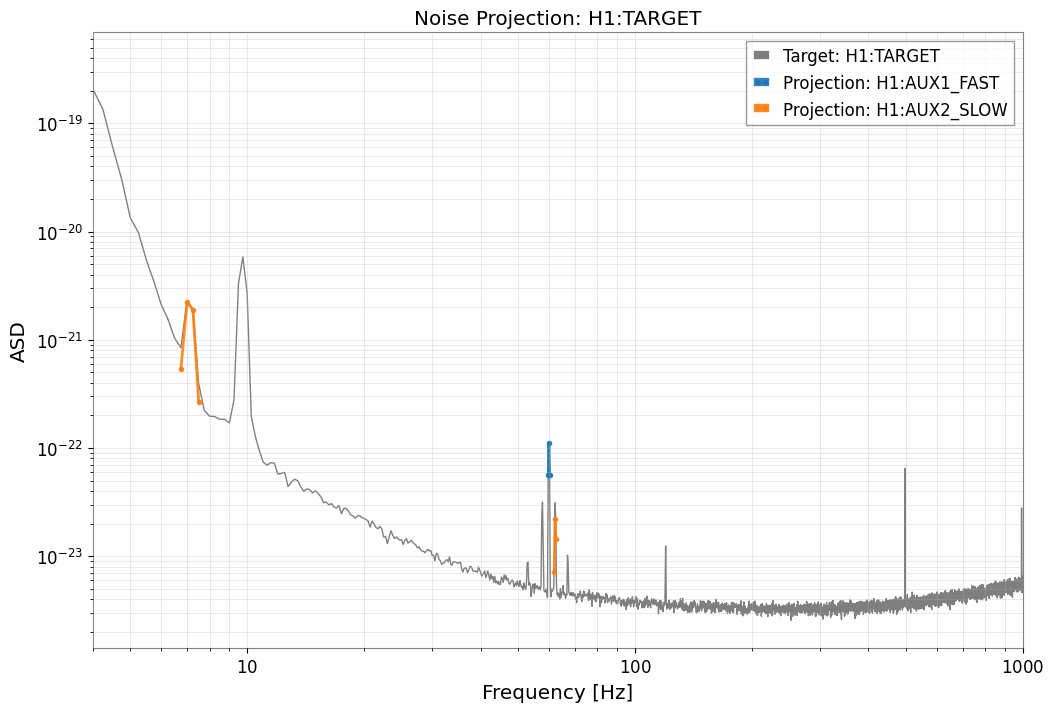
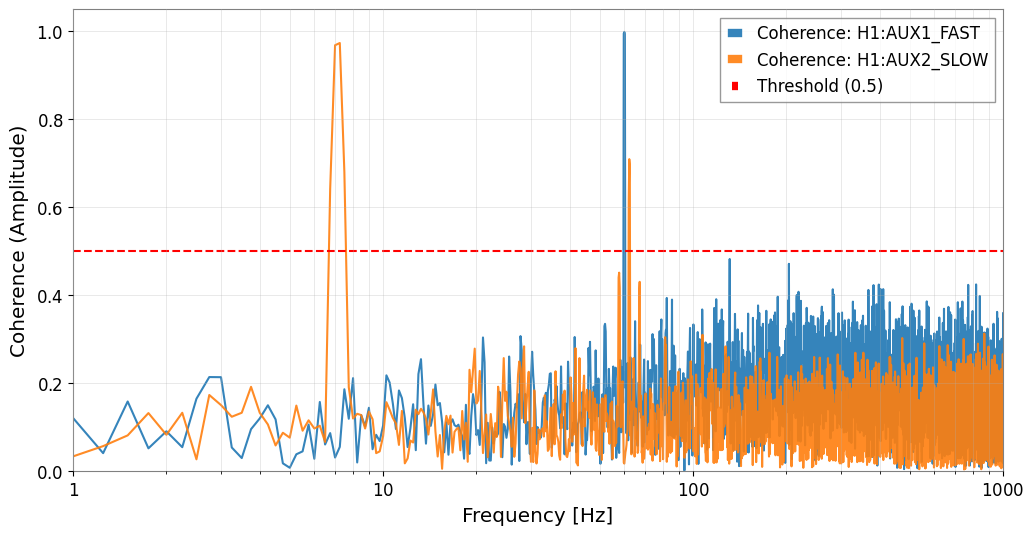
| 0 | 60.00 | 1 | H1:AUX1_FAST | 0.998699 | 1.118712e-22 |
| 1 | 59.75 | 1 | H1:AUX1_FAST | 0.994909 | 5.587699e-23 |
| 2 | 60.25 | 1 | H1:AUX1_FAST | 0.994519 | 5.570859e-23 |
| 3 | 7.25 | 1 | H1:AUX2_SLOW | 0.973445 | 1.888851e-21 |
| 4 | 7.00 | 1 | H1:AUX2_SLOW | 0.968398 | 2.211076e-21 |
| 5 | 62.25 | 1 | H1:AUX2_SLOW | 0.709532 | 2.210663e-23 |
| 6 | 62.50 | 1 | H1:AUX2_SLOW | 0.695847 | 1.435894e-23 |
| 7 | 7.50 | 1 | H1:AUX2_SLOW | 0.680465 | 2.682833e-22 |
| 8 | 6.75 | 1 | H1:AUX2_SLOW | 0.641778 | 5.413037e-22 |
| 9 | 62.00 | 1 | H1:AUX2_SLOW | 0.615101 | 7.153501e-24 |
| 10 | 131.25 | 1 | H1:AUX1_FAST | 0.482609 | 1.772034e-24 |
| 11 | 203.75 | 1 | H1:AUX1_FAST | 0.471606 | 1.572731e-24 |
| 12 | 57.75 | 1 | H1:AUX2_SLOW | 0.451528 | 1.428494e-23 |
| 13 | 57.50 | 1 | H1:AUX2_SLOW | 0.440484 | 9.442593e-24 |
| 14 | 67.25 | 1 | H1:AUX2_SLOW | 0.430697 | 3.624043e-24 |
[6]:
result.plot_projection(coherence_threshold=0.5)
plt.xlim(4, 1000)
plt.show()

result.plot_coherence(coherence_threshold=0.5)
plt.xlim(1, 1000)
plt.show()
[7]:
report_path = result.generate_report("bruco_report", coherence_threshold=0.4)
report_path
[7]:
'bruco_report/index.html'
Section 2: 高度な前処理と仮説検証 (Deep Dive: Nonlinear & Bilinear)
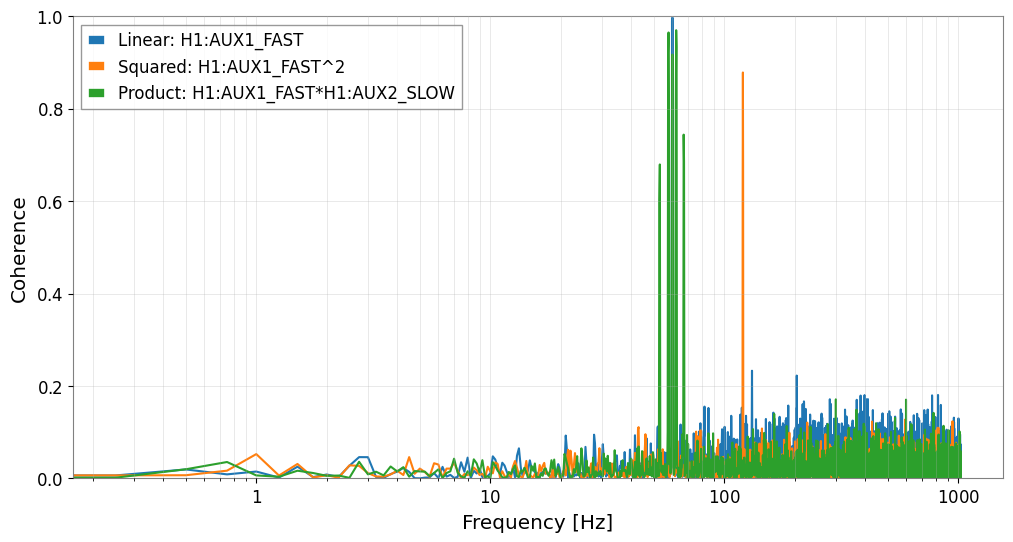
FastCoherenceEngine を使うと、ターゲットのFFTを再計算せずに仮想チャンネルを高速に試せます。物理的意図: こうした仮想チャンネルは fast × slow のような結合モデルを表し、高周波キャリアが低周波のアライメント変動・制御揺らぎ・環境ドリフトで変調される状況を検証します。
失敗しやすい点: 高域通過や帯域通過で成分分離をせずに広帯域チャンネル同士をそのまま掛けると、積が無関係な低周波パワーに支配され、得られたコヒーレンスの解釈が難しくなります。
仮想ウィットネスを信じる前の確認:
合成方法がもっともらしい結合機構に対応しているか
変調帯域が物理的に意味のある狭さになっているか
回復したコヒーレンスが、実際にサイドバンドやライン揺らぎがある帯域に局在しているか
[8]:
ts_sq = aux1**2
ts_sq.name = f"{aux1.name}^2"

ts_prod = aux1 * aux2
ts_prod.name = f"{aux1.name}*{aux2.name}"
[9]:
engine = FastCoherenceEngine(target, fftlength=fftlength, overlap=overlap)

coh_linear = engine.compute_coherence(aux1)
coh_sq = engine.compute_coherence(ts_sq)
coh_prod = engine.compute_coherence(ts_prod)

freqs = engine.frequencies
[10]:
fig, ax = plt.subplots(figsize=(12, 6))
ax.semilogx(freqs, coh_linear, label=f"Linear: {aux1.name}")
ax.semilogx(freqs, coh_sq, label=f"Squared: {ts_sq.name}")
ax.semilogx(freqs, coh_prod, label=f"Product: {ts_prod.name}")

ax.set_xlabel("Frequency [Hz]")
ax.set_ylabel("Coherence")
ax.set_ylim(0.0, 1.0)
ax.grid(True, which="both", ls="-", alpha=0.4)
ax.legend()
plt.show()
Section 3: 下流解析への接続 (Actionable Outcome)
よくある失敗: 投影した残差を、そのまま実際の差し引き結果だと見なすこと。投影はウィットネスが代表性を持ち条件も良いと仮定した見積もりです。ウィットネスが汚染されていたり遅延していたり、結合が断続的だったりすると、改善量は楽観的に見積もられます。ここは本格的な subtraction を始める前のスクリーニング段階として扱ってください。
[11]:
target_asd = target.asd(fftlength=fftlength, overlap=overlap)
target_asd_vals = target_asd.value

coh_map = {
    aux1.name: coh_linear,
    ts_sq.name: coh_sq,
    ts_prod.name: coh_prod,
}

dominant_label = max(coh_map, key=lambda k: np.nanmax(coh_map[k]))
dominant_coh = coh_map[dominant_label]

# Estimate virtual channel contribution in ASD using Bruco's projection formula
projected_asd = target_asd_vals * np.sqrt(dominant_coh)
residual_asd_vals = np.sqrt(np.maximum(target_asd_vals**2 - projected_asd**2, 0.0))

residual_asd = target_asd.copy()
residual_asd.value[:] = residual_asd_vals

fig, ax = plt.subplots(figsize=(12, 6))
# ax.loglog(target_asd.frequencies.value, target_asd_vals, label="Target ASD")
# ax.loglog(target_asd.frequencies.value, residual_asd_vals, label="Residual ASD")
ax.loglog(target_asd, label="Target ASD")
ax.loglog(residual_asd, label="Residual ASD")
ax.set_xlabel("Frequency [Hz]")
ax.set_ylabel("ASD")
ax.grid(True, which="both", ls="-", alpha=0.4)
ax.legend()
plt.show()

# BNS Range comparison
bns_range_before = inspiral_range(target_asd**2, mass1=1.4, mass2=1.4, fmin=10)
bns_range_after = inspiral_range(residual_asd**2, mass1=1.4, mass2=1.4, fmin=10)

print(f"Dominant hypothesis: {dominant_label}")
print(f"BNS range (before): {bns_range_before.to_value(u.Mpc):.2f} Mpc")
print(f"BNS range (after):  {bns_range_after.to_value(u.Mpc):.2f} Mpc")
Dominant hypothesis: H1:AUX1_FAST
BNS range (before): 182.48 Mpc
BNS range (after):  186.24 Mpc
[12]:
virtual_channels = {
    aux1.name: aux1,
    ts_sq.name: ts_sq,
    ts_prod.name: ts_prod,
}

culprit_channels = [dominant_label]
witnesses = TimeSeriesDict({name: virtual_channels[name] for name in culprit_channels})

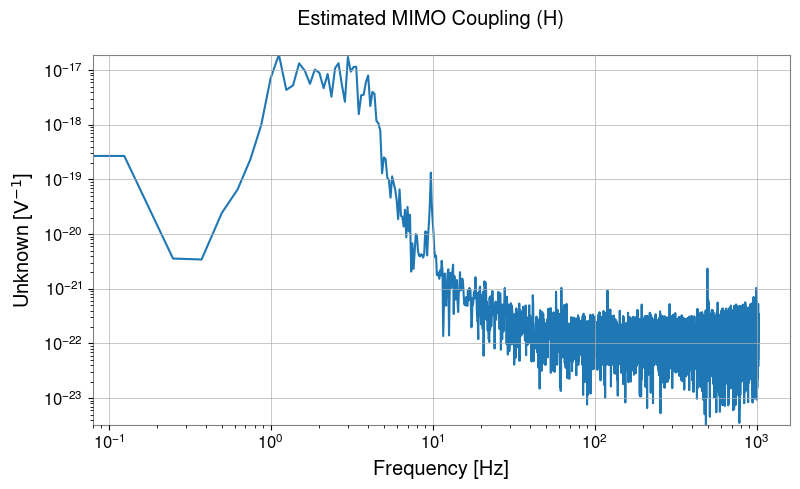
cxx = witnesses.csd_matrix(fftlength=8.0)
cyx = TimeSeriesDict({"TARGET": target}).csd_matrix(other=witnesses, fftlength=8.0)

# Matrix operation H = Cyx @ Cxx^-1
H_lowres = cyx @ cxx.inv()

# Display estimated transfer function
H_lowres.abs().plot(xscale="log", yscale="log").suptitle("Estimated MIMO Coupling (H)")
plt.show()

# Full-resolution FFT


tsd = TimeSeriesDict({"MAIN": target, **witnesses})
aux_names = culprit_channels

tsd_fft = tsd.fft()
main_fft = tsd_fft["MAIN"]

# Filter interpolation and matrix operation
H = H_lowres.interpolate(main_fft.frequencies)
X_mat = FrequencySeriesDict({k: tsd_fft[k] for k in aux_names}).to_matrix()

# Projection and subtraction
Y_proj = (H @ X_mat)[0, 0]
cleaned_fft = main_fft - Y_proj

# To time domain
cleaned_ts = cleaned_fft.ifft()
[13]:
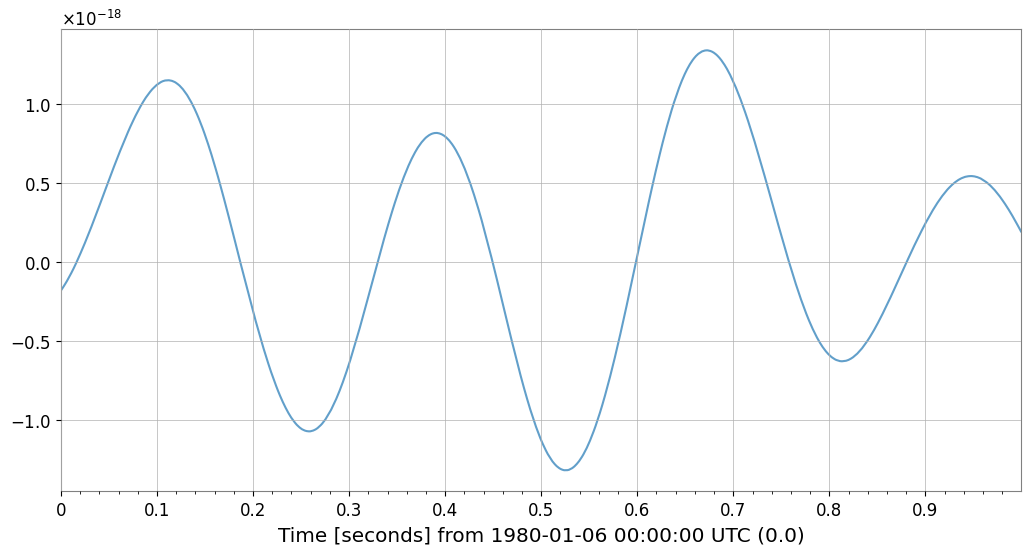
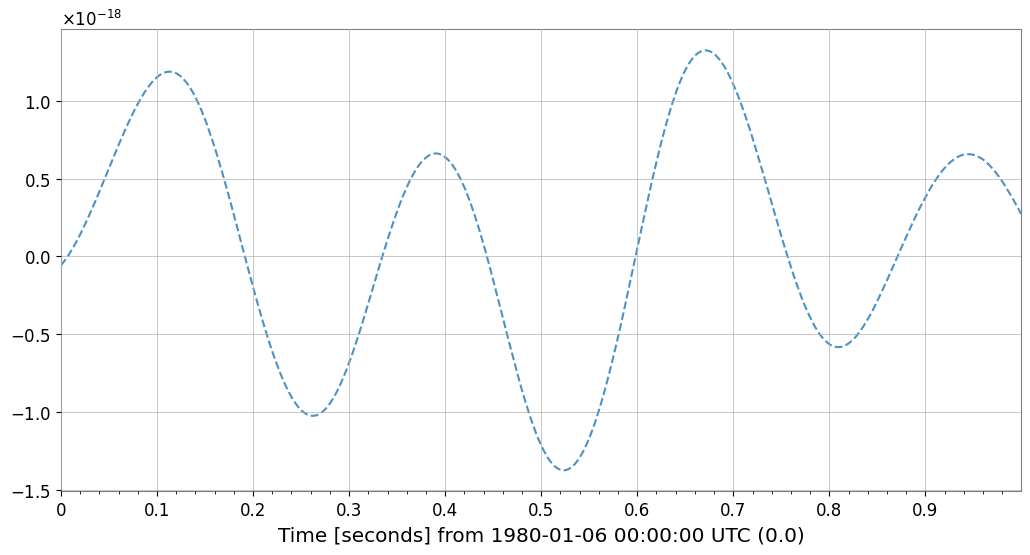
# Verify noise subtraction effect
fig = plt.figure(figsize=(12, 6))
ax = fig.gca()

# Overlay original and cleaned data (first 1 second)
plot_duration = 1.0
target.crop(end=target.t0.value + plot_duration).plot(
    ax=ax, label="Original", alpha=0.7
)  # noqa: F821
cleaned_ts.crop(end=target.t0.value + plot_duration).plot(
    ax=ax, label="Cleaned (Bruco)", linestyle="--", alpha=0.8
)  # noqa: F821

ax.set_title(f"Noise Subtraction Result (First {plot_duration}s)")
ax.legend(["Original", "Cleaned (Bruco)"])
plt.show()