Note
このページは Jupyter Notebook から生成されました。 ノートブックをダウンロード (.ipynb)
[1]:
# Skipped in CI: Colab/bootstrap dependency install cell.
Bruco: バイリニアカップリングと AM/FM 復調

通常の Bruco スキャンは DARM と補助チャンネル間の線形コヒーレンスのみを検出します。 実際の干渉計ノイズには非線形カップリング機構が多く存在し、線形スキャンでは見逃されます。 このチュートリアルでは O4 コミッショニング解析と gwexpy 利用カタログから抽出した 2 つの応用パターンを紹介します。
バイリニアカップリング検出 —
fast × slow合成ウィットネスを作成し Bruco を再スキャンHilbert AM/FM 復調 — スペクトル線の瞬時振幅/周波数を抽出し環境センサと相関
両者で共通する物理的な問いは、DARM に見えている高周波特徴を、どの低速な環境・制御変数が変調しているのか、そしてその仮説を Bruco が試せる形にどう符号化するかです。
セットアップ
[2]:
import warnings
warnings.filterwarnings("ignore", category=UserWarning)
warnings.filterwarnings("ignore", category=DeprecationWarning)

# ruff: noqa: I001
import matplotlib.pyplot as plt
import numpy as np
from astropy import units as u
from scipy.signal import hilbert

from gwexpy.analysis import Bruco
from gwexpy.timeseries import TimeSeries, TimeSeriesDict
1. モックデータ生成
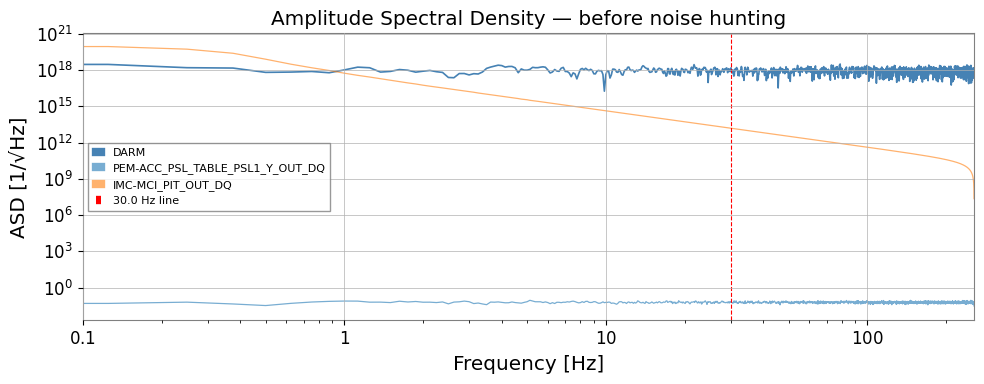
DARM チャンネルには Gaussian フロアに加え、以下の 2 種類のノイズを重畳します。
ノイズ種別 |
機構 |
特徴 |
|---|---|---|
バイリニア |
|
fast チャンネル周波数付近にサイドバンド |
AM ライン |
|
振幅が揺らぐ 30 Hz ライン |
線形 Bruco では個々のウィットネスチャンネルと DARM の直接コヒーレンスは低く、 バイリニアカップリングは検出されません。
よくある誤り: ベースラインの線形スキャンだけを見て「結合はない」と判断すること。バイリニア問題では、線形ウィットネスが失敗すること自体が期待される診断結果です。
[3]:
rng = np.random.default_rng(0)

fs = 512          # sample rate [Hz]
T  = 128.0        # duration [s]
n  = int(fs * T)
t  = np.arange(n) / fs

# ------------------------------------------------------------------
# Independent physical sources
# ------------------------------------------------------------------
# 1. Broadband Gaussian noise — the "true" DARM floor
src_broad = rng.normal(0, 1, n)

# 2. A fast vibration source (e.g. PSL table accelerometer)
#    Contains a 116 Hz mechanical resonance driven broadband
src_fast = rng.normal(0, 1, n)   # broadband fast channel

# 3. A slow environmental drift (e.g. IMC alignment, thermal)
#    Bandwidth 0.1 – 5 Hz
src_slow_raw = rng.normal(0, 1, n)
from scipy.signal import butter, lfilter
b, a = butter(4, [0.1, 5], btype='band', fs=fs)
src_slow = lfilter(b, a, src_slow_raw)

# ------------------------------------------------------------------
# SCENARIO A: BILINEAR COUPLING
#   A fast vibration (116 Hz) is amplitude-modulated by the slow drift
#   and couples into DARM.
#   DARM_bilinear ~ src_fast * src_slow  (frequency-shifted sidebands)
# ------------------------------------------------------------------
BILINEAR_COUPLING = 0.6
darm_bilinear = BILINEAR_COUPLING * src_fast * src_slow

# ------------------------------------------------------------------
# SCENARIO B: AM-MODULATED LINE
#   A 30 Hz line (e.g. power harmonics) is amplitude-modulated
#   by the slow drift → instability visible in Hilbert amplitude
# ------------------------------------------------------------------
LINE_FREQ  = 30.0   # Hz
LINE_AMP   = 0.4
AM_DEPTH   = 0.5    # modulation index
carrier    = np.sin(2 * np.pi * LINE_FREQ * t)
envelope   = 1 + AM_DEPTH * src_slow / (np.std(src_slow) + 1e-10)
darm_am    = LINE_AMP * carrier * np.clip(envelope, 0, None)

# ------------------------------------------------------------------
# DARM = floor + bilinear noise + AM line
# ------------------------------------------------------------------
darm_raw = src_broad + darm_bilinear + darm_am

target = TimeSeries(
    darm_raw, dt=1/fs, unit=u.dimensionless_unscaled,
    name="K1:CAL-CS_PROC_DARM_STRAIN_DBL_DQ", t0=0,
)

# Auxiliary channels
# fast witness: correlated with src_fast (pure witness, no slow info)
witness_fast = TimeSeries(
    src_fast + 0.2 * rng.normal(0, 1, n),
    dt=1/fs, unit=u.dimensionless_unscaled,
    name="K1:PEM-ACC_PSL_TABLE_PSL1_Y_OUT_DQ", t0=0,
)
# slow witness: correlated with src_slow
witness_slow = TimeSeries(
    src_slow + 0.05 * rng.normal(0, 1, n),
    dt=1/fs, unit=u.dimensionless_unscaled,
    name="K1:IMC-MCI_PIT_OUT_DQ", t0=0,
)

aux_dict = TimeSeriesDict({
    witness_fast.name: witness_fast,
    witness_slow.name: witness_slow,
})

print(f"DARM   sample rate : {target.sample_rate}")
print(f"Duration           : {T} s")
print(f"Aux channels       : {list(aux_dict.keys())}")
DARM   sample rate : 512.0 Hz
Duration           : 128.0 s
Aux channels       : ['K1:PEM-ACC_PSL_TABLE_PSL1_Y_OUT_DQ', 'K1:IMC-MCI_PIT_OUT_DQ']
[4]:
fig, ax = plt.subplots(figsize=(10, 4))
asd = target.asd(fftlength=8, overlap=4)
ax.loglog(asd.frequencies.value, asd.value, label="DARM", color="steelblue", lw=1.2)
for name, ts in aux_dict.items():
    a = ts.asd(fftlength=8, overlap=4)
    ax.loglog(a.frequencies.value, a.value, alpha=0.6, lw=0.9,
              label=name.split(":")[-1])
ax.axvline(LINE_FREQ, color="red",  ls="--", lw=0.8, label=f"{LINE_FREQ} Hz line")
ax.set_xlim(0.1, fs / 2)
ax.set_xlabel("Frequency [Hz]")
ax.set_ylabel("ASD [1/√Hz]")
ax.set_title("Amplitude Spectral Density — before noise hunting")
ax.legend(fontsize=8)
plt.tight_layout()
plt.show()
2. 線形 Bruco スキャン(ベースライン)
2 つのウィットネスチャンネルで通常の線形コヒーレンススキャンを実行します。 バイリニアカップリングはここでは見えないことを確認します。
[5]:
bruco = Bruco(target_channel=target.name, aux_channels=[])

result_linear = bruco.compute(
    fftlength=8.0, overlap=4.0,
    target_data=target, aux_data=aux_dict,
    top_n=2,
)
print("Linear Bruco scan complete.")
result_linear.plot_projection(coherence_threshold=0.3)
plt.xlim(0.1, fs / 2)
plt.title("Linear Bruco projection")
plt.show()

df_linear = result_linear.to_dataframe(ranks=[0])
print("\nTop coherences (linear scan):")
print(df_linear.sort_values("coherence", ascending=False).head(10).to_string(index=False))
Linear Bruco scan complete.
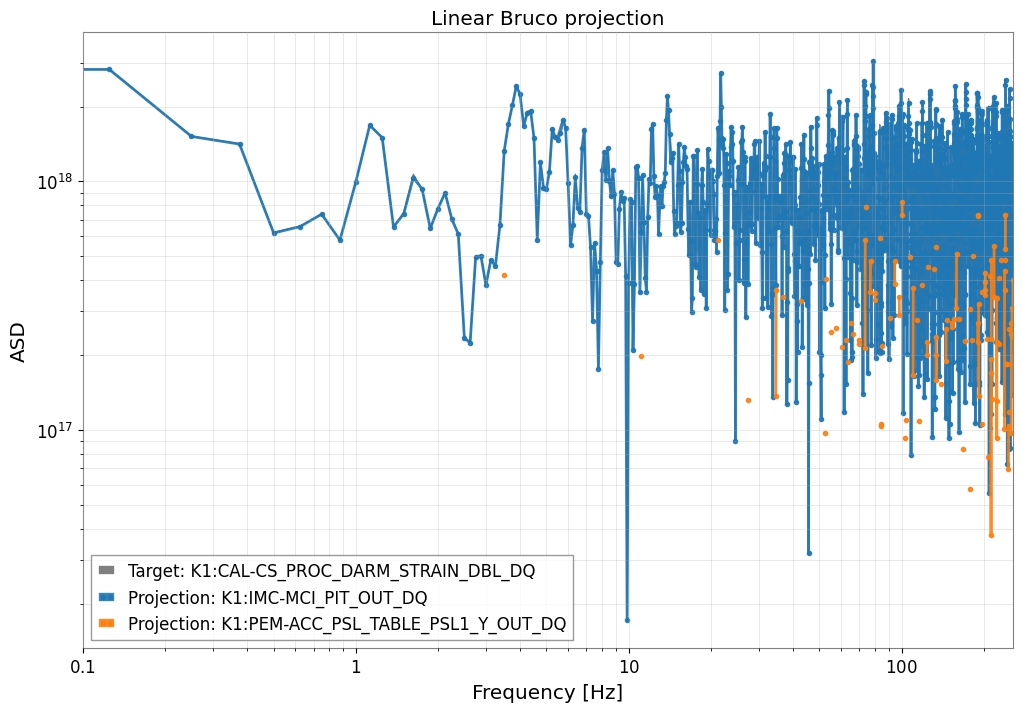
Top coherences (linear scan):
 frequency  rank               channel  coherence   projection
    49.000     1 K1:IMC-MCI_PIT_OUT_DQ   0.999987 1.691310e+18
   241.875     1 K1:IMC-MCI_PIT_OUT_DQ   0.999975 1.162312e+18
   193.625     1 K1:IMC-MCI_PIT_OUT_DQ   0.999962 1.043952e+17
   200.875     1 K1:IMC-MCI_PIT_OUT_DQ   0.999919 1.092047e+18
    53.875     1 K1:IMC-MCI_PIT_OUT_DQ   0.999912 1.399128e+18
   108.000     1 K1:IMC-MCI_PIT_OUT_DQ   0.999904 1.332632e+18
    92.750     1 K1:IMC-MCI_PIT_OUT_DQ   0.999893 1.490317e+18
   170.250     1 K1:IMC-MCI_PIT_OUT_DQ   0.999892 8.576261e+17
   249.500     1 K1:IMC-MCI_PIT_OUT_DQ   0.999889 3.130930e+17
   114.000     1 K1:IMC-MCI_PIT_OUT_DQ   0.999872 8.098280e+17
3. バイリニアカップリング検出
レシピ(O4b DARM 116 Hz 解析・IMMT バイリニアコミッショニング解析より):
fast_hp = witness_fast.highpass(10)        # DC / 低周波ドリフトを除去
slow_bp = witness_slow.bandpass(0.1, 5)    # ゆっくりした変調帯域のみ抽出
witness_bilinear = fast_hp * slow_bp       # バイリニア合成ウィットネス
この合成チャンネルは干渉計内部の積型非線形性を模擬します。 DARM が fast × slow を含む場合、バイリニアウィットネスとの高いコヒーレンスが現れます。
拡張チャンネルセットを Bruco.compute() に渡して再スキャンします。
失敗しやすい点: slow 側の帯域を広く取りすぎたり、fast 側に DC ドリフトを残したまま積を作ること。どちらも積ウィットネスをぼかし、見かけ上は強そうでも帯域局在しないコヒーレンスを生みがちです。slow 側は想定する変調帯域に合わせてください。
[6]:
# ------------------------------------------------------------------
# Build bilinear witness: fast × slow
# ------------------------------------------------------------------
fast_hp = witness_fast.highpass(10)    # remove DC / drift from fast channel
slow_bp = witness_slow.bandpass(0.1, 5) # keep only slow modulation band

witness_bilinear = fast_hp * slow_bp
witness_bilinear.name = "BILINEAR:fast×slow"

aux_extended = TimeSeriesDict({
    witness_fast.name:     witness_fast,
    witness_slow.name:     witness_slow,
    witness_bilinear.name: witness_bilinear,
})

result_bilinear = bruco.compute(
    fftlength=8.0, overlap=4.0,
    target_data=target, aux_data=aux_extended,
    top_n=3,
)
print("Bilinear-extended Bruco scan complete.")
result_bilinear.plot_projection(coherence_threshold=0.3)
plt.xlim(0.1, fs / 2)
plt.title("Bruco projection — with bilinear witness (fast × slow)")
plt.show()

df_bilinear = result_bilinear.to_dataframe(ranks=[0])
print("\nTop coherences (bilinear-extended scan):")
print(df_bilinear.sort_values("coherence", ascending=False).head(10).to_string(index=False))
Bilinear-extended Bruco scan complete.
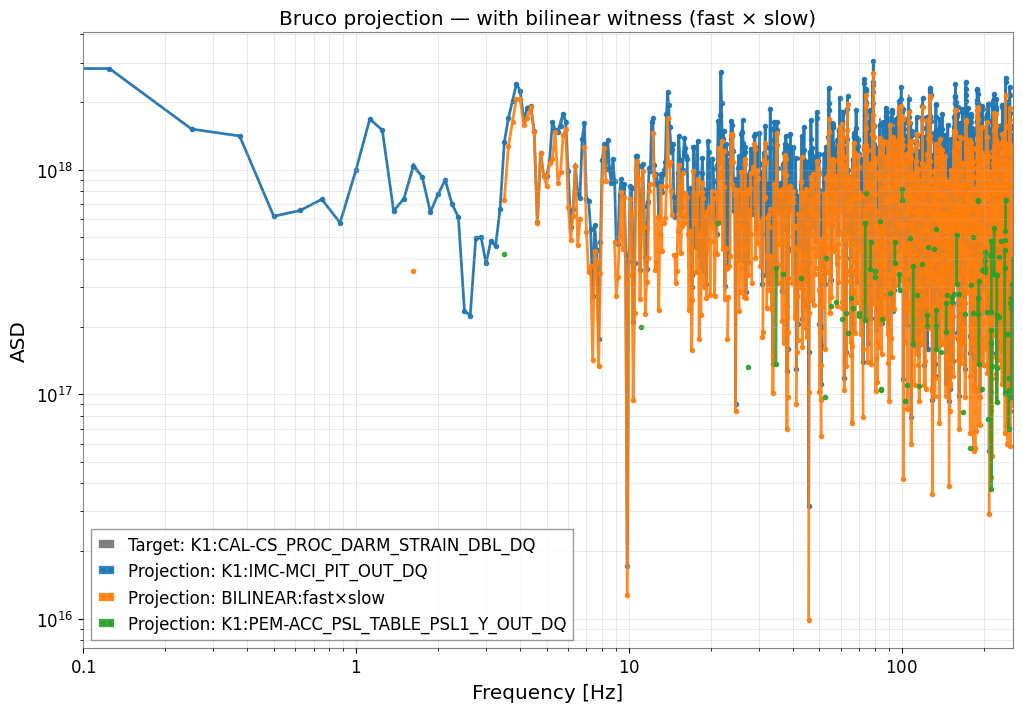
Top coherences (bilinear-extended scan):
 frequency  rank               channel  coherence   projection
    49.000     1 K1:IMC-MCI_PIT_OUT_DQ   0.999987 1.691310e+18
   241.875     1 K1:IMC-MCI_PIT_OUT_DQ   0.999975 1.162312e+18
   193.625     1 K1:IMC-MCI_PIT_OUT_DQ   0.999962 1.043952e+17
   200.875     1 K1:IMC-MCI_PIT_OUT_DQ   0.999919 1.092047e+18
    53.875     1 K1:IMC-MCI_PIT_OUT_DQ   0.999912 1.399128e+18
   108.000     1 K1:IMC-MCI_PIT_OUT_DQ   0.999904 1.332632e+18
    92.750     1 K1:IMC-MCI_PIT_OUT_DQ   0.999893 1.490317e+18
   170.250     1 K1:IMC-MCI_PIT_OUT_DQ   0.999892 8.576261e+17
   249.500     1 K1:IMC-MCI_PIT_OUT_DQ   0.999889 3.130930e+17
   114.000     1 K1:IMC-MCI_PIT_OUT_DQ   0.999872 8.098280e+17
[7]:
# Compare DARM ASD vs bilinear projection
asd_darm = target.asd(fftlength=8, overlap=4)
fftlength = 8.0; overlap = 4.0

coh_lin  = target.coherence(witness_fast, fftlength=fftlength, overlap=overlap)
coh_bili = target.coherence(witness_bilinear, fftlength=fftlength, overlap=overlap)

proj_lin  = asd_darm * coh_lin ** 0.5
proj_bili = asd_darm * coh_bili ** 0.5

# Mask below threshold
THRESH = 0.2
proj_lin.value[coh_lin.value   < THRESH] = np.nan
proj_bili.value[coh_bili.value < THRESH] = np.nan

fig, axes = plt.subplots(2, 1, figsize=(10, 8), sharex=True)

axes[0].loglog(asd_darm.frequencies.value, asd_darm.value,
               color="steelblue", label="DARM", lw=1.2)
axes[0].loglog(proj_lin.frequencies.value, proj_lin.value,
               color="orange", label="Linear projection (fast)", lw=1.2)
axes[0].loglog(proj_bili.frequencies.value, proj_bili.value,
               color="red", label="Bilinear projection (fast×slow)", lw=1.2)
axes[0].set_ylabel("ASD [1/√Hz]")
axes[0].set_title("Noise projection comparison: linear vs bilinear")
axes[0].legend(fontsize=8)
axes[0].set_xlim(1, fs / 2)

axes[1].semilogx(coh_lin.frequencies.value,  coh_lin.value,
                 color="orange", label="Linear coherence (fast)")
axes[1].semilogx(coh_bili.frequencies.value, coh_bili.value,
                 color="red",    label="Bilinear coherence (fast×slow)")
axes[1].axhline(THRESH, color="gray", ls="--", lw=0.8, label=f"threshold = {THRESH}")
axes[1].set_xlabel("Frequency [Hz]")
axes[1].set_ylabel("Coherence")
axes[1].legend(fontsize=8)

plt.tight_layout()
plt.show()
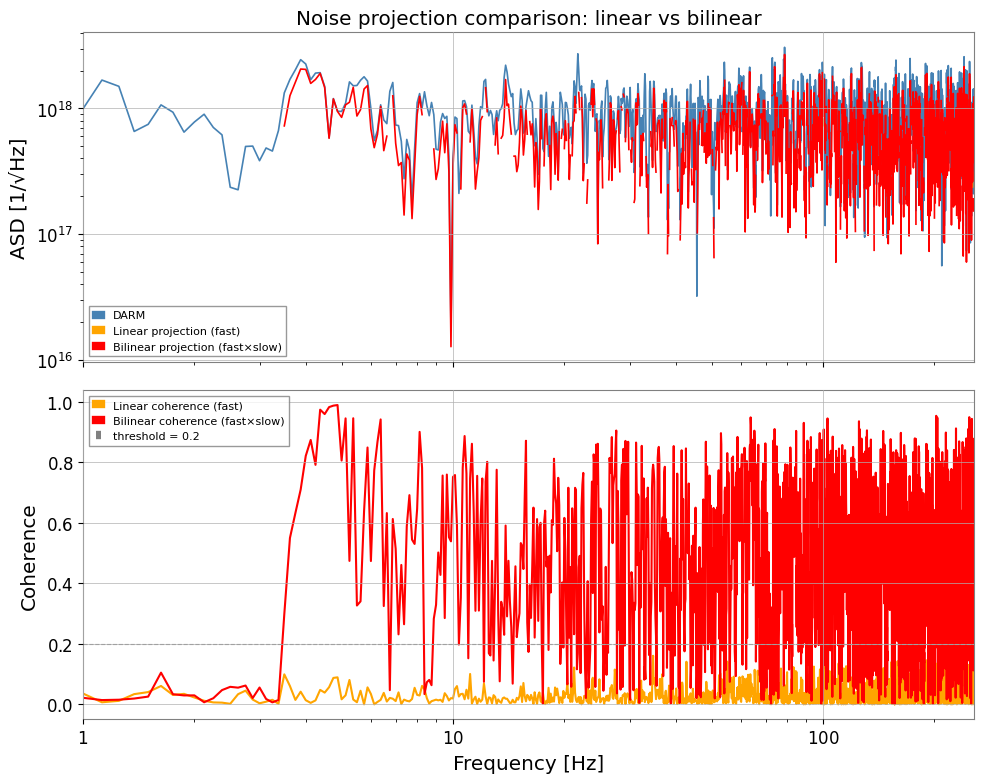
4. Hilbert AM/FM 復調
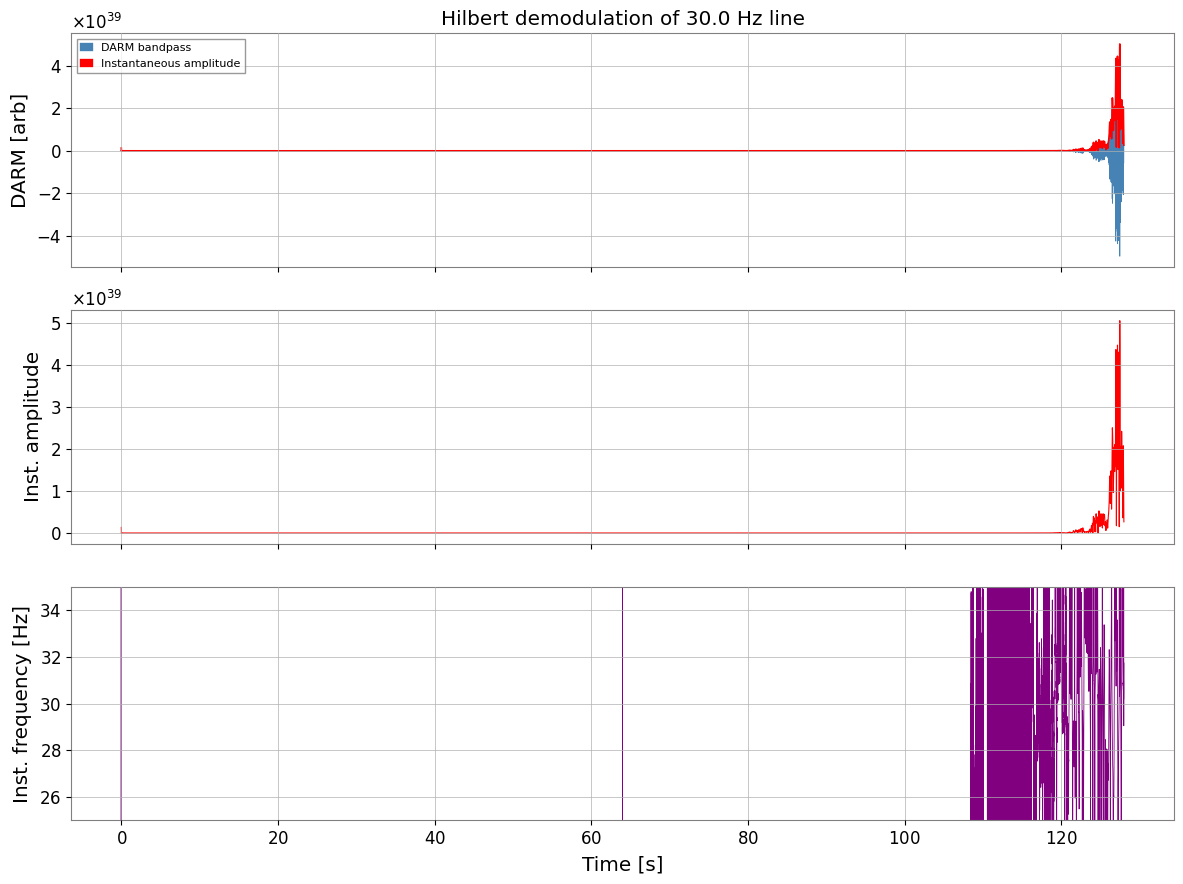
スペクトル線がゆっくりした環境擾乱で振幅変調(AM)または周波数変調(FM)されている場合、 キャリア周波数と低速チャンネルの直接コヒーレンスはゼロです。しかし、 包絡線は高いコヒーレンスを持ちます。
レシピ(O4c PEM injection シェーカー解析より):
darm_bp   = darm.bandpass(f_line - FW, f_line + FW)    # ライン周辺をバンドパス
z         = scipy.signal.hilbert(darm_bp.value)          # 解析信号
inst_amp  = abs(z)                                        # 瞬時振幅(包絡線)
inst_freq = diff(unwrap(angle(z))) / (2π Δt)             # 瞬時周波数
inst_amp および inst_freq を低速補助チャンネルと相関させ、 変調源を特定します。
よくある誤り: 生のキャリア ASD と低速ウィットネスを相関させただけで探索を打ち切ること。AM/FM 問題の本体は、多くの場合キャリア周波数そのものではなく包絡線や瞬時周波数側に現れます。
[8]:
# ------------------------------------------------------------------
# Hilbert AM/FM demodulation of the DARM line at LINE_FREQ Hz
# ------------------------------------------------------------------
FW = 5.0   # half-bandwidth around the line [Hz]

# 1. Isolate the line with a bandpass filter
darm_bp = target.bandpass(LINE_FREQ - FW, LINE_FREQ + FW)

# 2. Analytic signal via Hilbert transform
z = hilbert(darm_bp.value)           # complex analytic signal
inst_amp_val  = np.abs(z)            # instantaneous amplitude (envelope)
inst_phs_val  = np.unwrap(np.angle(z))
# instantaneous frequency = d(phase)/dt / (2π)
dt = float(darm_bp.dt.value)
inst_freq_val = np.diff(inst_phs_val) / (2 * np.pi * dt)
# Pad to match length
inst_freq_val = np.append(inst_freq_val, inst_freq_val[-1])

inst_amp  = TimeSeries(inst_amp_val,  dt=dt, unit=u.dimensionless_unscaled, t0=0,
                       name="DARM_inst_amp")
inst_freq = TimeSeries(inst_freq_val, dt=dt, unit=u.Hz, t0=0,
                       name="DARM_inst_freq")

# 3. Quick check: plot amplitude envelope and instantaneous frequency
fig, axes = plt.subplots(3, 1, figsize=(12, 9), sharex=True)

axes[0].plot(darm_bp.times.value, darm_bp.value,   lw=0.5, color="steelblue",
             label="DARM bandpass")
axes[0].plot(inst_amp.times.value, inst_amp.value, lw=1.2, color="red",
             label="Instantaneous amplitude")
axes[0].set_ylabel("DARM [arb]")
axes[0].legend(fontsize=8)
axes[0].set_title(f"Hilbert demodulation of {LINE_FREQ} Hz line")

axes[1].plot(inst_amp.times.value, inst_amp.value, color="red", lw=0.8)
axes[1].set_ylabel("Inst. amplitude")

axes[2].plot(inst_freq.times.value, inst_freq.value, color="purple", lw=0.6)
axes[2].set_ylim(LINE_FREQ - FW, LINE_FREQ + FW)
axes[2].set_ylabel("Inst. frequency [Hz]")
axes[2].set_xlabel("Time [s]")

plt.tight_layout()
plt.show()
5. AM/FM と低速ウィットネスのコヒーレンス
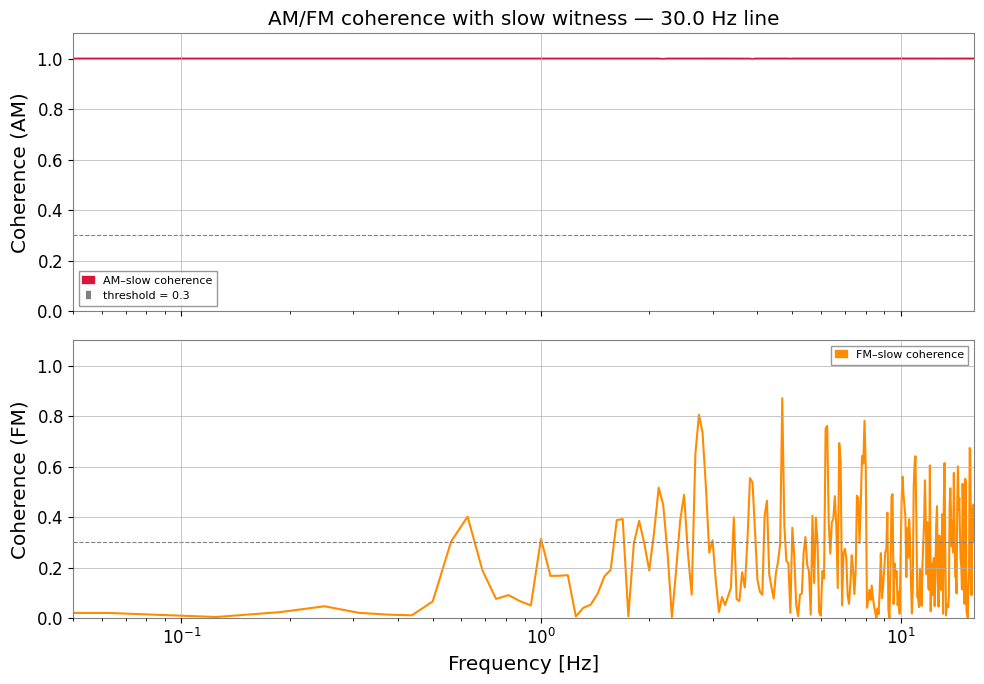
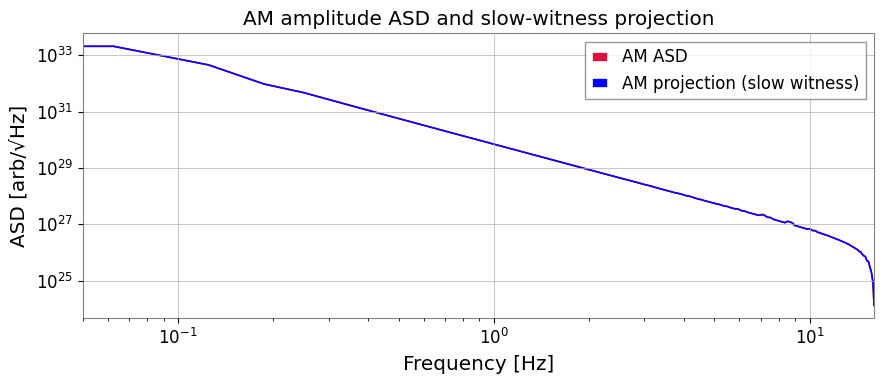
Hilbert 包絡線(inst_amp)と瞬時周波数(inst_freq)は 変調周波数帯域(ここでは 0 – 5 Hz)に独自の ASD を持ちます。 これらと低速環境チャンネルのコヒーレンスを計算し、変調源を特定します。
注意したい失敗モード: キャリア周辺の帯域通過が広すぎると隣接ラインが解析信号へ漏れ、狭すぎると包絡線が人工的に潰れます。1 本の物理的ライン族を分離できる窓幅に調整してください。
[9]:
# ------------------------------------------------------------------
# Coherence of AM/FM signals with slow witness
# ------------------------------------------------------------------
# Resample to reduce computation (inst_amp modulation is slow)
RESAMP_FS = 32   # Hz — well above the 5 Hz modulation bandwidth

inst_amp_rs  = inst_amp.resample(RESAMP_FS)
inst_freq_rs = inst_freq.resample(RESAMP_FS)
slow_rs      = witness_slow.resample(RESAMP_FS)

fftlength_slow = 16.0; overlap_slow = 8.0

coh_am = inst_amp_rs.coherence(slow_rs, fftlength=fftlength_slow,
                                overlap=overlap_slow)
coh_fm = inst_freq_rs.coherence(slow_rs, fftlength=fftlength_slow,
                                 overlap=overlap_slow)

fig, axes = plt.subplots(2, 1, figsize=(10, 7), sharex=True)

axes[0].semilogx(coh_am.frequencies.value, coh_am.value,
                 color="crimson", label="AM–slow coherence")
axes[0].axhline(0.3, color="gray", ls="--", lw=0.8, label="threshold = 0.3")
axes[0].set_ylabel("Coherence (AM)")
axes[0].set_title(f"AM/FM coherence with slow witness — {LINE_FREQ} Hz line")
axes[0].legend(fontsize=8)
axes[0].set_ylim(0, 1.1)

axes[1].semilogx(coh_fm.frequencies.value, coh_fm.value,
                 color="darkorange", label="FM–slow coherence")
axes[1].axhline(0.3, color="gray", ls="--", lw=0.8)
axes[1].set_ylabel("Coherence (FM)")
axes[1].set_xlabel("Frequency [Hz]")
axes[1].legend(fontsize=8)
axes[1].set_ylim(0, 1.1)
axes[1].set_xlim(0.05, RESAMP_FS / 2)

plt.tight_layout()
plt.show()

# ASD projection: how much of the line amplitude fluctuation is explained?
asd_am = inst_amp_rs.asd(fftlength=fftlength_slow, overlap=overlap_slow)
asd_am_proj = asd_am * coh_am ** 0.5
THRESH = 0.2
asd_am_proj.value[coh_am.value < THRESH] = np.nan

fig, ax = plt.subplots(figsize=(9, 4))
ax.loglog(asd_am.frequencies.value, asd_am.value,
          color="crimson", label="AM ASD", lw=1.2)
ax.loglog(asd_am_proj.frequencies.value, asd_am_proj.value,
          color="blue", label="AM projection (slow witness)", lw=1.2)
ax.set_xlim(0.05, RESAMP_FS / 2)
ax.set_xlabel("Frequency [Hz]")
ax.set_ylabel("ASD [arb/√Hz]")
ax.set_title("AM amplitude ASD and slow-witness projection")
ax.legend()
plt.tight_layout()
plt.show()
まとめ
ステップ |
ツール |
目的 |
|---|---|---|
モックデータ |
バイリニアノイズ + AM ライン |
|
|
ベースライン確認 — 非線形カップリングは見えない |
|
|
バイリニアカップリング検出 |
|
|
スペクトル線の AM/FM 成分抽出 |
|
|
変調源の特定 |
重要なポイント
線形 Bruco だけでは不十分な場合がある。カップリングが
DARM ≈ f_fast × f_slowの形を持つときは、fast × slow合成ウィットネスがコヒーレンスを回復させる。Hilbert 復調はキャリア(高周波)と変調(低周波)を分離し、 変調帯域でのコヒーレンス探索を可能にする。
どちらのパターンも
TimeSeriesの四則演算(*、.highpass()、.bandpass())とBruco.compute()のみで実現できる。期待される物理が積型や低速変調なら、ベースライン線形スキャンの失敗自体が重要な手掛かりになる。
次のステップ
実データは
TimeSeries.read()で NDS/GWF から読み込む。バイリニアスキャンを全
(ch_fast, ch_slow)ペアに系統的に拡張する。Spectrogram.normalize(method='snr')と組み合わせて 振幅変調の時間発展を SNR スペクトログラムとして追跡する。
[10]:
print("=" * 68)
print("  Advanced Bruco Workflow Summary")
print("=" * 68)
rows = [
    ("1", "Mock data generation",
     "Bilinear noise + AM-modulated 30 Hz line"),
    ("2", "Linear Bruco scan",
     "Missed bilinear coupling (only direct coherence)"),
    ("3", "Bilinear witness: fast×slow",
     "ts_fast.highpass() * ts_slow.bandpass() → Bruco.compute()"),
    ("4", "Hilbert demodulation",
     "bandpass → hilbert() → inst_amp, inst_freq"),
    ("5", "AM/FM coherence scan",
     "inst_amp.coherence(slow) — identifies modulation source"),
]
print(f"  {'Step':<4}  {'Stage':<28}  {'Key operation'}")
print("-" * 68)
for step, stage, key in rows:
    print(f"  {step:<4}  {stage:<28}  {key}")
print("=" * 68)
====================================================================
  Advanced Bruco Workflow Summary
====================================================================
  Step  Stage                         Key operation
--------------------------------------------------------------------
  1     Mock data generation          Bilinear noise + AM-modulated 30 Hz line
  2     Linear Bruco scan             Missed bilinear coupling (only direct coherence)
  3     Bilinear witness: fast×slow   ts_fast.highpass() * ts_slow.bandpass() → Bruco.compute()
  4     Hilbert demodulation          bandpass → hilbert() → inst_amp, inst_freq
  5     AM/FM coherence scan          inst_amp.coherence(slow) — identifies modulation source
====================================================================